كل الخدمات،
وانت بمنزلك.
Every home service,
right where you are.
سباكة، كهرباء، تنظيف، تكييف وأكثر — اطلب، قارن عروض الأسعار من مزوّدين موثّقين، واحجز بثقة. Plumbing, electrical, cleaning, AC and more — request, compare quotes from verified pros, and book with confidence.

بثلاث خطواتThree steps
كيف يعمل التطبيقHow it works
لا توجد أسعار ثابتة — أنت من يقرّر بعد أن ترى العروض.No fixed prices — you decide after you see the quotes.
اطلب الخدمةRequest a service
اختر الخدمة والوقت وموقعك، وأضف صورة للمشكلة إن أردت.Pick the service, time and location, and add a photo of the issue if you like.
استلم عروض الأسعارGet quotes
يرسل لك المزوّدون سعرهم ومدّتهم مع تقييمهم — وافق على الأنسب.Providers send a price and duration with their rating — approve the best.
أنجز وقيّمGet it done
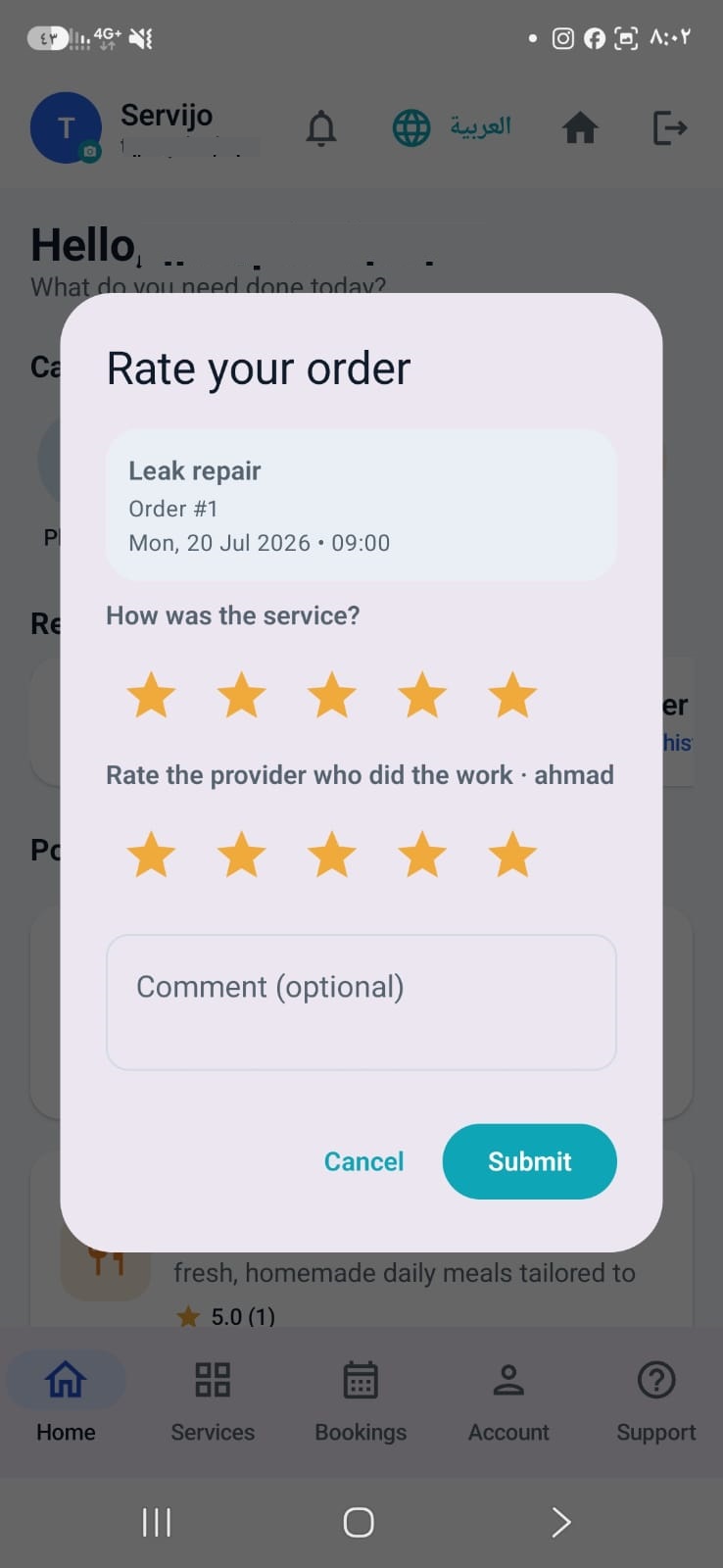
يصل المزوّد وينفّذ العمل، ثم تؤكّده وتقيّم الخدمة والمزوّد.The pro arrives and does the work; you confirm it and rate the service and provider.
لماذا servijoWhy servijo
مصمّم للثقة والراحةBuilt for trust and ease
كل ما تحتاجه لطلب خدمة منزلية وأنت مطمئن.Everything you need to book a home service with peace of mind.
مزوّدون موثّقونVerified providers
توثيق الهوية بالوثيقة والصورة قبل قبول أي مزوّد.ID and photo verification before any provider is approved.
أسعار شفّافةTransparent pricing
لا رسوم خفيّة على الزبون — تدفع للمزوّد المبلغ المتّفق عليه.No hidden customer fees — you pay the provider the agreed amount.
تقييمات حقيقيةReal ratings
تقيّم الخدمة والمزوّد بعد الإنجاز — الجودة تنافس السعر.Rate the service and the provider after the job — quality competes with price.
آمن وخاصSafe & private
أرقام الهواتف تُكشف قرب الموعد فقط، وبياناتك محميّة.Phone numbers are revealed only near the appointment; your data is protected.
حجز فوري وتذكيرInstant booking & reminders
احجز في دقائق، وتصلك تنبيهات بكل تحديث على طلبك.Book in minutes and get alerts on every update to your request.
عربي وإنجليزيArabic & English
واجهة كاملة باللغتين مع عملة بلدك.Full bilingual interface with your local currency.
لمحةA look inside
التطبيق من الداخلInside the app
تصفّح، اطلب، تابع طلبك خطوة بخطوة.Browse, request, and track your booking step by step.
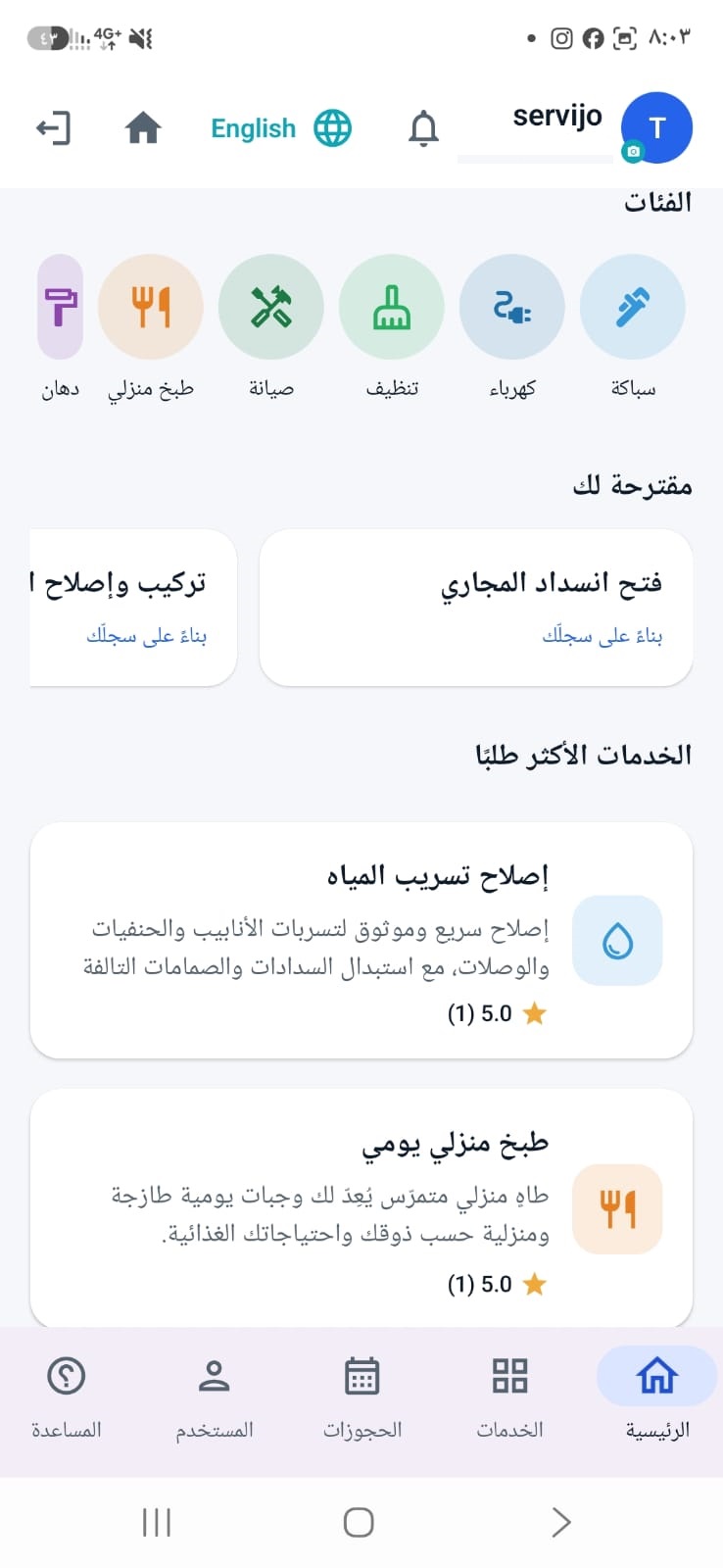
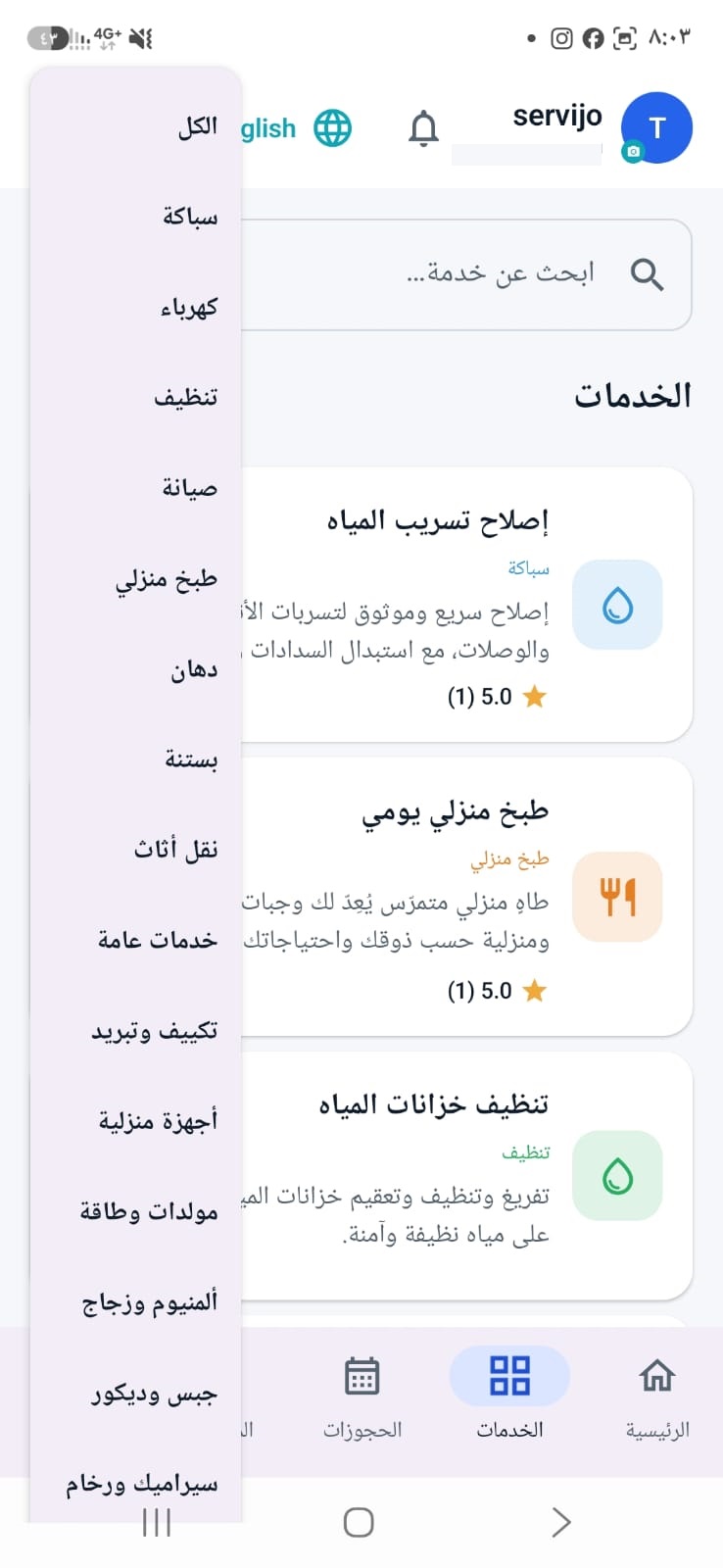
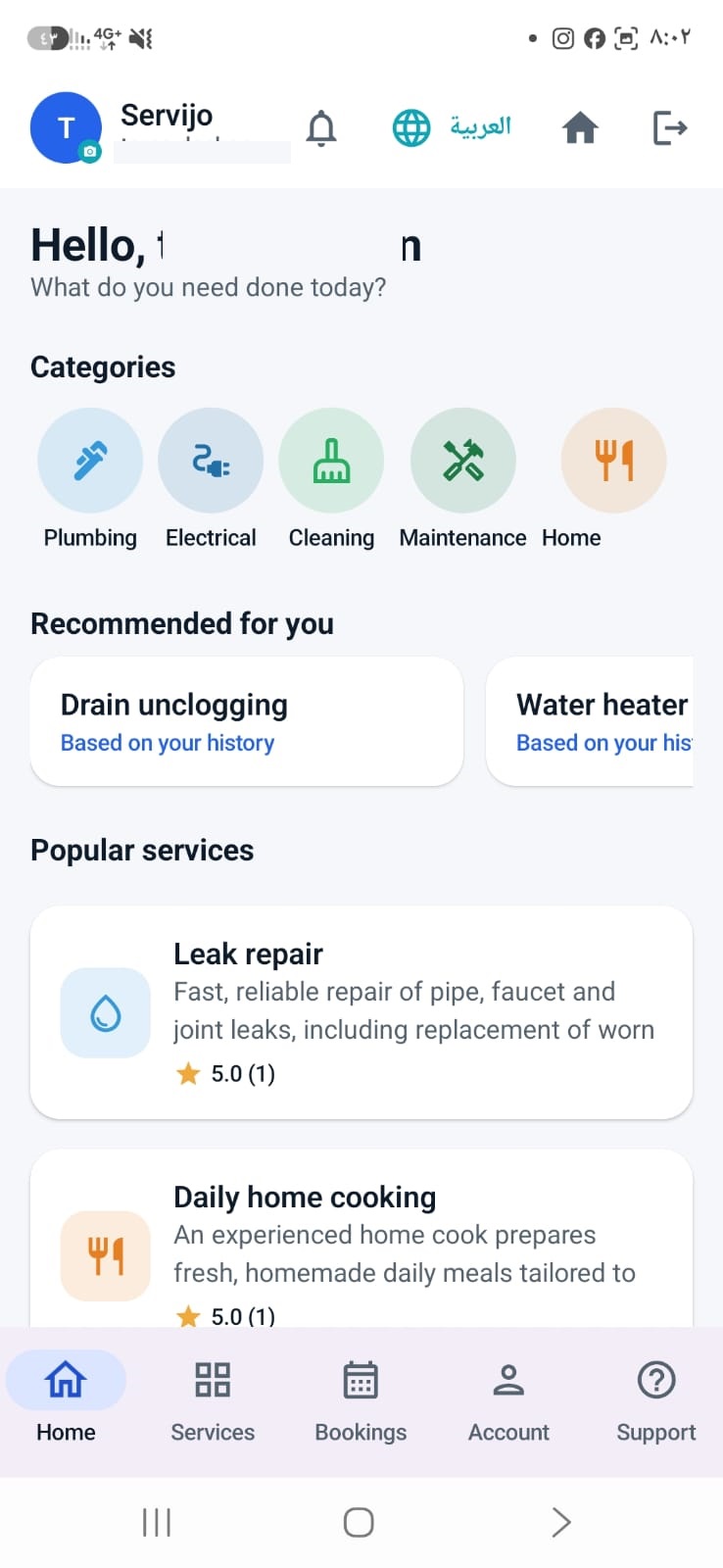
الخدماتServices
تغطية واسعة لمنزلكWide coverage for your home
أكثر من ٨ فئات و٢٥ خدمة — مختارة لاحتياجات المنطقة.8+ categories and 25+ services — chosen for the region's needs.
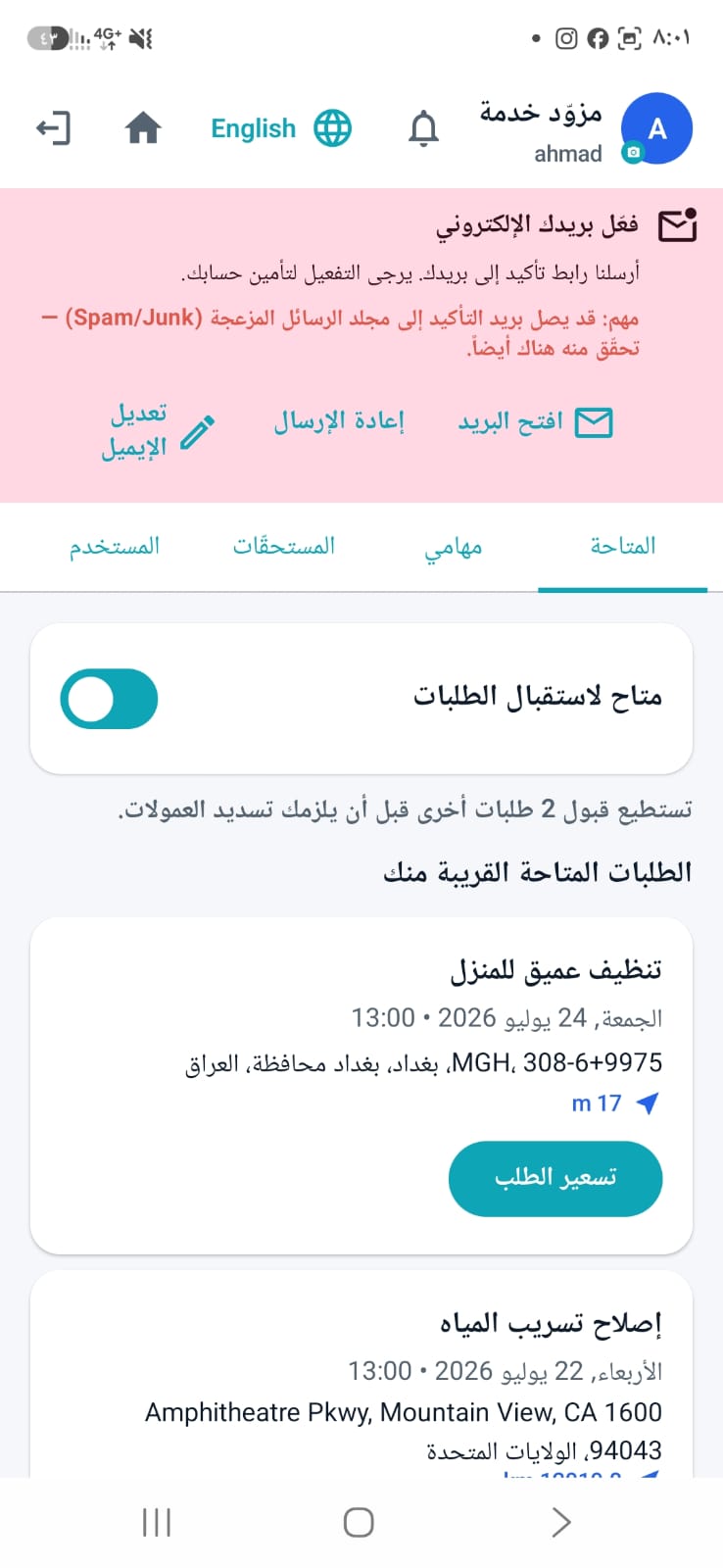
للمزوّدينFor providers
مزوّد خدمة؟ استلم أعمالاً واكسبA provider? Get jobs and earn
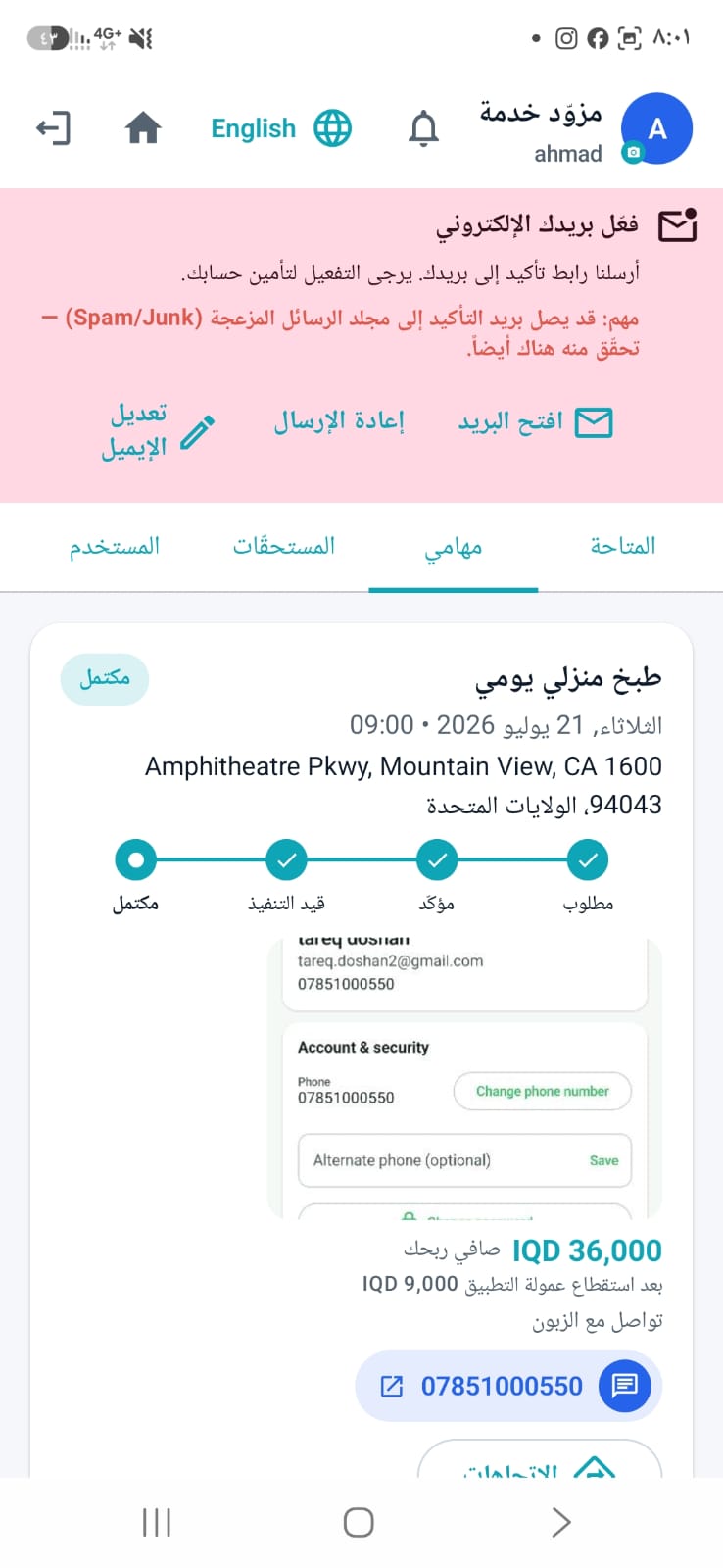
سجّل، وثّق هويتك، واستقبل طلبات قريبة منك. أنت من يسعّر، وتعرف صافي ربحك قبل القبول.Register, verify your identity, and receive nearby requests. You set the price and see your net earnings before you accept.
طلبات قريبة منكNearby requests
تظهر لك طلبات تخصّصك مرتّبة حسب الأقرب مع المسافة بالكيلومتر.Requests in your fields, sorted by distance with the kilometres shown.
تسعير وعمولة واضحةClear price & commission
تحدّد سعرك، ويعرض التطبيق العمولة وصافي ربحك قبل الإرسال.Set your price; the app shows the commission and your net before you send.
تحصيل وسمعةGet paid & build a name
تحصّل المبلغ مباشرة من الزبون، وتبني سمعتك بتقييمات حقيقية.Collect directly from the customer and build your reputation on real ratings.
الأدلةUser guides
تعلّم الاستخدام خطوة بخطوةLearn how to use it, step by step
افتح الدليل في المتصفّح أو حمّله PDF — لكل من الزبون والمزوّد.Open the guide in your browser or download the PDF — for both customers and providers.
الأسئلة الشائعةFAQ
أسئلة شائعة عن التطبيقFrequently asked questions
كل ما تحتاج معرفته عن التسجيل، طلب الخدمة، الدفع، والانضمام كمزوّد.Everything you need to know about registering, requesting a service, paying, and joining as a provider.
ما هو تطبيق servijo؟What is servijo?
تطبيق يربطك بمزوّدي خدمات منزلية موثّقين قريبين منك — سباكة، كهرباء، تنظيف، تكييف وتبريد، صيانة عامة وغيرها. تنشر طلبك، يرسل لك المزوّدون عروض أسعارهم، وتختار العرض الذي يناسبك.An app that connects you with verified home-service providers near you — plumbing, electrical, cleaning, cooling and AC, general maintenance and more. You post a request, providers send you their quotes, and you pick the one that suits you.
هل استخدام التطبيق مجاني؟Is the app free to use?
نعم. التحميل والتسجيل وطلب الخدمة مجانية تماماً للزبون، ولا نضيف أي رسوم على المبلغ الذي تتفق عليه مع المزوّد. لا اشتراكات ولا رسوم مخفيّة.Yes. Downloading, registering and requesting a service are completely free for customers, and we add nothing on top of the amount you agree with the provider. No subscriptions, no hidden fees.
كيف أنشئ حساباً؟How do I create an account?
افتح التطبيق واختر «إنشاء حساب»، ثم أدخل اسمك الكامل وبريدك الإلكتروني وكلمة مرور ورقم هاتفك، وحدّد موقعك، واختر التسجيل بصفة زبون أو مزوّد خدمة. بعدها سجّل الدخول بالبريد وكلمة المرور نفسها — لا يستغرق الأمر أكثر من دقيقة.Open the app and tap Create account, then enter your full name, email, a password and your phone number, set your location, and choose to register as a customer or a service provider. Then sign in with the same email and password — it takes about a minute.
نسيت كلمة المرور، ماذا أفعل؟I forgot my password — what now?
في شاشة تسجيل الدخول اضغط «نسيت كلمة المرور؟» وأدخل بريدك الإلكتروني المسجَّل، فتصلك رسالة فيها رابط لتعيين كلمة مرور جديدة. إن لم تجدها فتحقّق من مجلّد «البريد المزعج».On the sign-in screen tap Forgot password? and enter the email registered on your account; you'll get a message with a link to set a new one. If it doesn't arrive, check your spam folder.
كيف أطلب خدمة؟How do I request a service?
اختر الفئة ثم الخدمة التي تحتاجها، حدّد الموعد المناسب لك وموقعك على الخريطة، وأضف وصفاً للمشكلة أو صورة لها إن أردت — الصورة تساعد المزوّد على تسعير أدقّ. أرسل الطلب، فيصل إلى المزوّدين المختصّين القريبين منك.Pick the category and then the service you need, choose a time that suits you and your location on the map, and add a description or a photo of the problem if you like — a photo helps the provider quote more accurately. Send the request and it reaches the relevant providers near you.
هل الخدمة متوفّرة في منطقتي؟Is the service available in my area?
التطبيق يعرض لك المزوّدين حسب قربهم من موقعك، فالتغطية تعتمد على وجود مزوّدين مسجّلين قريبين منك — وعددهم يزداد باستمرار. سجّل مجاناً وجرّب طلباً؛ وإن لم يصلك أي عرض فراسلنا لنعرف أن منطقتك تحتاج مزوّدين.The app shows providers by how close they are to you, so coverage depends on providers registered near you — and that number keeps growing. Register free and try a request; if no quote comes in, email us so we know your area needs providers.
لماذا يطلب التطبيق موقعي؟Why does the app ask for my location?
لسببين فقط: أن نعرض لك المزوّدين الأقرب إليك ونحسب المسافة بينكما، وأن يعرف المزوّد الذي وافقت على عرضه إلى أين يأتي. لا نتتبّع موقعك في الخلفية، ولا يظهر عنوانك إلا للمزوّد المرتبط بطلبك.For two reasons only: to show you the nearest providers and work out the distance, and so the provider whose quote you approved knows where to come. We don't track your location in the background, and your address is only shown to the provider handling your request.
هل أحفظ عنواني لطلبات لاحقة؟Can I save my address for later requests?
نعم، يوجد «العناوين المحفوظة»: تحفظ عنوان المنزل أو العمل مرة واحدة، ثم تختاره بضغطة في كل طلب جديد بدل تحديد الموقع من جديد.Yes — there's a Saved addresses list. Save home or work once, then pick it with one tap on every new request instead of setting the location again.
كيف تُحدَّد الأسعار؟How are prices decided?
لا توجد أسعار ثابتة في التطبيق. المزوّدون هم من يقدّمون عروضهم على طلبك، ويظهر لك في كل عرض السعر ومدّة التنفيذ وتقييم المزوّد وعدد أعماله السابقة، فتوافق على العرض الأنسب. ولك أن ترفض العروض كلها دون أي التزام أو رسوم.There are no fixed prices. Providers quote on your request, and each quote shows you the price, how long the job will take, the provider's rating and how many jobs they have completed — so you approve the one that fits. You can also decline every quote, with no obligation and no charge.
كيف ومتى أدفع؟How and when do I pay?
تدفع للمزوّد مباشرةً بعد إنجاز العمل وتأكيدك أنه اكتمل، بالمبلغ المتّفق عليه في العرض الذي وافقت عليه. التطبيق لا يمرّر أي مبالغ ولا يطلب منك بطاقة أو أي بيانات دفع.You pay the provider directly once the work is done and you have confirmed it, at the amount agreed in the quote you approved. The app never handles the money and never asks you for a card or any payment details.
ماذا لو نسيت تأكيد إنجاز العمل؟What if I forget to confirm the job is done?
لا مشكلة — إن لم تؤكّد، يُعتبر العمل منجزاً تلقائياً بعد ثلاثة أيام. لكن تأكيدك يفيد المزوّد لأنه يفتح له تسوية عمولته فوراً، ويفتح لك التقييم.No problem — if you don't confirm, the job counts as completed automatically after three days. Confirming still helps the provider, since it lets them settle their commission straight away, and it opens the rating for you.
كيف أتواصل مع المزوّد؟How do I contact the provider?
يُفتَح القناتان معاً قبل الموعد بوقت قصير: المحادثة داخل التطبيق ورقم الهاتف على الموعد نفسه، لأنّ المحادثة ليست إلاّ الصورة المكتوبة من الرقم. وكلما كان الموعد أقرب انفتحتا أبكر، وتُفتحان فوراً عند بدء العمل.Both channels open together, shortly before the appointment: the in-app chat and the phone number are on the same clock, because a chat is simply the written form of the number. The nearer the booking, the sooner they open, and both open immediately once the work starts.
هل أرسل صوراً داخل المحادثة؟Can I send photos in the chat?
المحادثة نصية فقط. الصور تُرفَق مع الطلب نفسه («أضف صورة») قبل إرساله — وهذه أفضل طريقة على أي حال، لأن الصورة تصل إلى كل المزوّدين الذين سيسعّرون طلبك لا إلى واحد فقط.The chat is text only. Photos are attached to the request itself (Add a photo) before you send it — which is better anyway, since the photo reaches every provider who will quote, not just one.
هل يمكنني إلغاء الطلب أو تعديله؟Can I cancel or change a request?
الإلغاء مجاني دائماً، وإتاحته تعتمد على المرحلة التي وصل إليها الطلب: طلب لم يقبله أي مزوّد بعد يمكنك سحبه في أي وقت؛ وبعد موافقتك على عرض سعر يُغلق الإلغاء قبل الموعد بثلاث ساعات، لأن المزوّد خصّص لك ذلك الوقت — وحينها تواصل معه عبر المحادثة للاتفاق على وقت بديل؛ وإن مرّ الموعد ولم يحضر المزوّد يعود الإلغاء متاحاً لك من جديد.Cancelling is always free, and whether it's available depends on how far the request has got: a request no provider has accepted yet can be withdrawn at any time; once you have approved a quote cancelling closes three hours before the appointment, because the provider has set that time aside — message them in the chat to agree another time instead; and if the appointment passes with no provider turning up, cancelling becomes available again.
ماذا لو لم يحضر المزوّد أو لم يكن العمل مُرضياً؟What if the provider doesn't show up, or the work isn't good?
لا تؤكّد إنجاز العمل. وإن مرّ الموعد ولم يأتِ أحد، يعود الإلغاء متاحاً لك فلا تبقى عالقاً مع طلب لا تستطيع إغلاقه ولا إلغاءه. ثم افتح «المساعدة والدعم» داخل التطبيق واستخدم «الإبلاغ عن مشكلة»: تصل البلاغات إلى الإدارة وتُراجَع، ويمكن إيقاف المزوّد المتكرّر في المشاكل. يمكنك إرفاق حتى ٣ صور، و«بلاغاتي» في الصفحة نفسها يحفظ كل بلاغ أرسلته وحالته — «تم الاستلام» ثم «قيد التحقق» ثم «قيد المعالجة» ثم «تم حل المشكلة» — لتتابعه وتردّ علينا إن طلبنا تفاصيل إضافية. وتقييمك بعد كل عمل هو ما يحمي بقيّة المستخدمين، فكن صريحاً فيه.Don't confirm the job as done. If the appointment passes and nobody came, cancelling opens up again so you aren't left holding a job you can neither close nor cancel. Then open Help & Support in the app and use Report a problem: reports reach our team and are reviewed, and a provider with repeated problems can be suspended. You can attach up to 3 photos, and My reports on the same page keeps every report you send with its state — Received, Under review, Being worked on, Resolved — so you can follow it and answer us if we ask for more detail. Your rating after every job is what protects everyone else — so be honest in it.
هل يقيّمني المزوّد أيضاً؟Does the provider rate me too?
نعم. كما تقيّم الخدمة والمزوّد بعد العمل، يستطيع المزوّد تقييمك كزبون. الغرض أن يحترم الطرفان الموعد والاتفاق — وهو ما يجعل المزوّدين الجيّدين يقبلون طلباتك بسرعة أكبر.Yes. Just as you rate the service and the provider after the job, the provider can rate you as a customer. It's there so both sides respect the appointment and the agreement — and it's what makes good providers accept your requests faster.
كيف أسجّل كمزوّد خدمة؟How do I register as a service provider?
اختر التسجيل بصفة «مزوّد خدمة»، حدّد تخصّصاتك ومنطقة عملك، ثم أكمل التوثيق: رقم الهوية أو جواز السفر، صورة للوثيقة، وصورة شخصية وأنت تمسكها مع رمز يظهر لك في التطبيق. تُلتقَط هذه الصور بالكاميرا في حينها (الصور من المعرض غير مقبولة)، ويمكنك إضافة شهادة خبرة اختيارياً. تراجع الإدارة طلبك، وبعد الموافقة تبدأ باستلام الطلبات القريبة منك.Choose to register as a service provider, set your trades and your working area, then complete verification: your ID or passport number, a photo of the document, and a selfie holding it together with a code the app shows you. These photos must be taken with the camera on the spot (gallery images aren't accepted), and you can optionally add a work certificate. Our team reviews your application, and once approved you start receiving requests near you.
ما تكلفة الانضمام كمزوّد؟What does it cost to join as a provider?
التسجيل والانضمام مجانيان، ولا يوجد اشتراك شهري ولا رسوم على الطلبات التي لا تفوز بها. تُستحقّ عمولة على الأعمال التي تنجزها فقط، ويعرض لك التطبيق قيمة العمولة وصافي ربحك قبل أن ترسل عرضك، وتُسدَّد للإدارة عبر وسيلة الدفع الإلكتروني المتوفّرة في منطقتك.Registering and joining are free — there's no monthly subscription and no charge for requests you don't win. Commission is due only on jobs you actually complete, the app shows you the commission and your net earnings before you send a quote, and it's settled with us through the electronic payment method available in your area.
للمزوّد: متى تُستحقّ العمولة وكيف أعرف مستحقاتي؟Providers: when is commission due, and where do I see it?
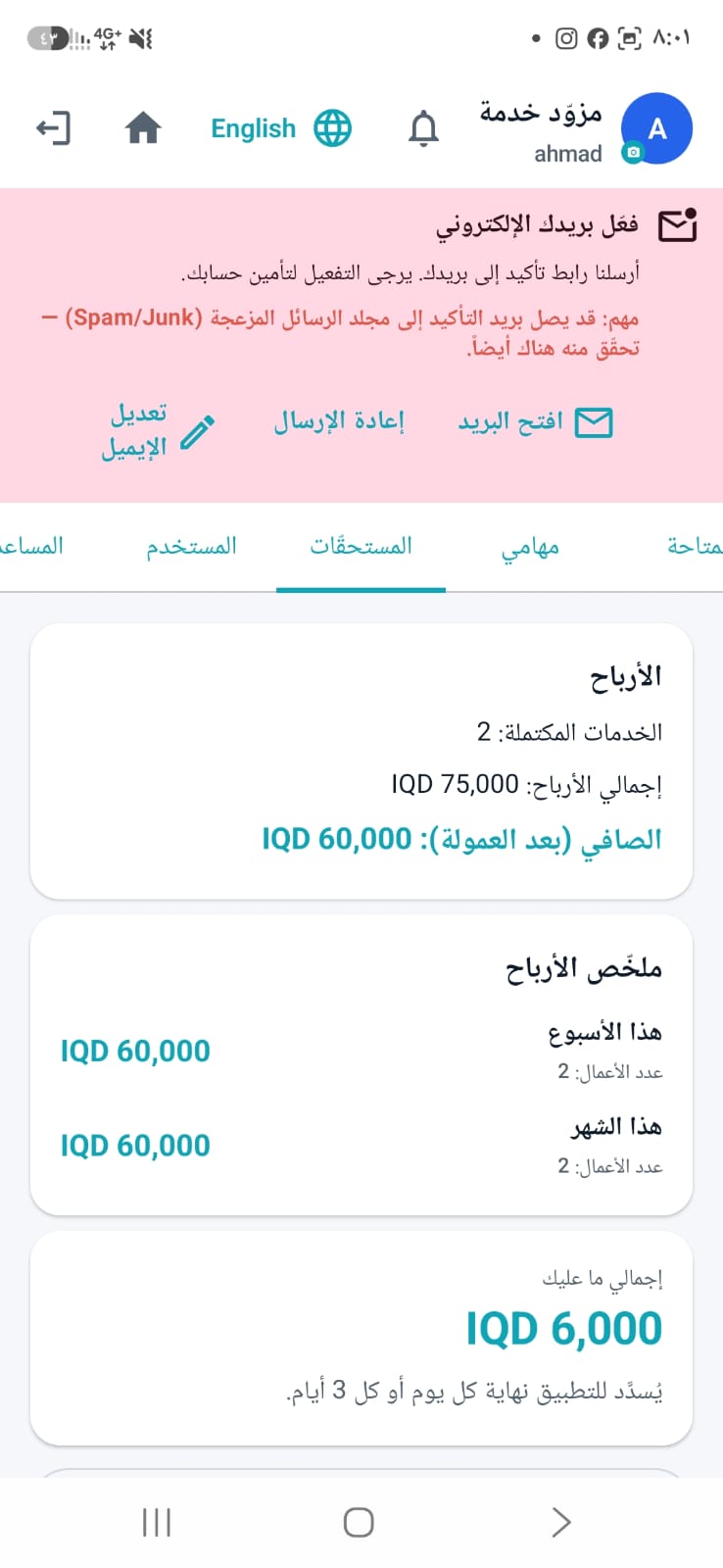
في التطبيق تبويب «المستحقات» يعرض العمولة لكل خدمة أنجزتها. تُفتَح عمولة أي عمل للدفع بعد أن يؤكّد الزبون إنجازه، أو تلقائياً بعد ثلاثة أيام من الإنجاز. والعرض الذي لم يُقبَل لا يكلّفك شيئاً. لكن انسحابك من عمل سبق أن اتّفقت عليه يترتّب عليه رسم إلغاء يظهر في القائمة نفسها — وللإدارة أن تعفيك منه بعد قراءة سببك. كما لا يمكنك تجاوز ثلاث مطالبات غير مسدَّدة قبل أن تتوقّف الأعمال الجديدة عن الوصول إليك.The app has a Dues tab listing the commission for every job you've completed. A job's commission becomes payable once the customer confirms it's done, or automatically three days after completion. A quote that was never accepted costs you nothing — but withdrawing from a job you had already agreed to carries a cancellation fee, which appears in the same list, and the admin can waive it after reading your reason. You may also hold at most three unsettled claims before new work stops reaching you.
هل يوجد إصدار للآيفون؟Is there an iPhone version?
ليس الآن — التطبيق متوفّر لأجهزة أندرويد فقط (7.0 فأحدث). إصدار الآيفون غير مطروح في الوقت الحالي، وإن توفّر سنعلن عنه في هذه الصفحة.Not yet — the app is available for Android only (7.0 and newer). An iPhone version isn't on offer at the moment; if that changes we'll announce it on this page.
هل التطبيق متوفّر على Google Play؟Is the app on Google Play?
نعم، التطبيق متاح الآن على Google Play وزرّه في قسم التحميل بالأعلى — وهذه هي الطريقة الأسهل لأنها تجلب التحديثات تلقائياً. ويبقى التحميل المباشر من هذا الموقع متاحاً وهو النسخة نفسها بالضبط: استخدمه إن كان جهازك بلا «خدمات Google Play»، أو إن لم يفتح رابط المتجر معك لأن التطبيق لم يصل بعد إلى بلدك.Yes — the app is now on Google Play and its button is in the download section above. That's the easier route because updates then arrive automatically. Direct download from this site stays available and is exactly the same build: use it if your device has no Google Play services, or if the Store link doesn't open for you because the app hasn't reached your country yet.
كيف يصلني التحديث إن ثبّتُّ التطبيق من الموقع؟How do I get updates if I installed from the site?
النسخة المحمّلة مباشرةً لا تُحدّث نفسها، لكن التطبيق ينبّهك برسالة «يتوفر إصدار جديد» كلّما صدر إصدار ويوصلك إلى رابط التحميل من هنا. حمّل الملف الجديد وثبّته فوق القديم — حسابك وبياناتك لا تتأثّر.A directly downloaded copy doesn't update itself, but the app shows a New version available notice whenever one is released and links you back here. Download the new file and install it over the old one — your account and data are untouched.
هل التطبيق بالعربية والإنجليزية؟Is the app in Arabic and English?
نعم، الواجهة كاملة بالعربية والإنجليزية، وتبدّل بينهما في أي وقت من تبويب «المستخدم» داخل التطبيق — أو من الزر في شاشة الدخول قبل أن يكون لديك حساب. وفي التبويب نفسه تختار المظهر: فاتح أو داكن أو اتّباع إعداد هاتفك.Yes — the whole interface is available in Arabic and English, and you can switch any time from the User tab, or from the button on the sign-in screen before you even have an account. The same tab sets the theme: light, dark, or follow your phone.
لماذا لا تصلني الإشعارات؟Why am I not receiving notifications?
تأكّد أولاً من السماح بالإشعارات للتطبيق في إعدادات الهاتف، ومن أن موفّر البطارية لا يقيّده. أما الأجهزة التي لا تحتوي «خدمات Google Play» — مثل أجهزة هواوي الحديثة — فلا تصلها إشعارات، ويعمل فيها كل شيء آخر بشكل طبيعي، وتحتاج فتح التطبيق لمتابعة طلبك. التفاصيل في صفحة التثبيت.First make sure notifications are allowed for the app in your phone's settings and that battery saver isn't restricting it. Devices without Google Play services — such as newer Huawei models — receive no notifications at all; everything else works normally on them, but you'll need to open the app to follow your request. Details are on the install page.
هل بياناتي آمنة؟Is my data safe?
لا نبيع بياناتك ولا نشاركها لأغراض تسويقية. موقعك ورقم هاتفك يظهران للمزوّد المرتبط بطلبك وحده وفي وقته المحدّد، ووثائق التوثيق تُستخدم للتحقّق من الهوية فقط. التفاصيل الكاملة في سياسة الخصوصية.We don't sell your data or share it for marketing. Your location and phone number are shown only to the provider handling your request, and only at the right time; verification documents are used solely to confirm identity. Full details are in our Privacy Policy.
كيف أحذف حسابي؟How do I delete my account?
من داخل التطبيق: تبويب «المستخدم» ← «حذف الحساب»، والحذف فوري ونهائي. وإن لم تستطع الدخول إلى حسابك راسلنا من البريد المسجَّل عليه. ما يُحذف وما يبقى موضّح في صفحة حذف الحساب.Inside the app: the User tab → Delete account; deletion is immediate and permanent. If you can no longer sign in, email us from the address registered on the account. What is deleted and what is kept is explained on the account deletion page.
هل أحتاج اتصال إنترنت؟ وما متطلّبات الجهاز؟Do I need an internet connection? What are the requirements?
نعم، يحتاج التطبيق اتصالاً بالإنترنت لعرض الطلبات والعروض والمحادثات، وينبّهك إن فقدت الاتصال. ويعمل على أندرويد 7.0 فأحدث، وحجمه صغير لا يثقل جهازك.Yes — the app needs an internet connection to show requests, quotes and chats, and it warns you if you go offline. It runs on Android 7.0 and newer, and it's small enough not to weigh your phone down.
لم تجد سؤالك؟ راسلنا على contact@servijo.com أو راجع أدلة الاستخدام.Didn't find your question? Email us at contact@servijo.com or read the user guides.
جاهز لتجربة أسهل؟Ready for the easier way?
حمّل «servijo» مجاناً وابدأ أول طلب اليوم. للزبائن والمزوّدين على حدٍّ سواء.Download servijo free and start your first request today — for customers and providers alike.
Google Play
التثبيت المعتاد، مع تحديثات تلقائية.The usual install, with automatic updates.
التثبيت من Google PlayGet it on Google Playتحميل مباشرDirect download
ملف APK يُثبَّت على أي جهاز أندرويد.An APK file that installs on any Android device.
تحميل APKDownload APK كيف أثبّت الملف؟How do I install it?